
Switch Between Workspaces
Use the workspace switcher at the bottom left to move between the workspaces in your account.
Find the switcher. At the bottom left of the screen, a card shows the workspace you are in, such as My Workspace, with up and down arrows. Your company name sits just above it.
Open the list. Select the card. A menu called Workspace lists your workspaces, with a check mark beside the one you are in.
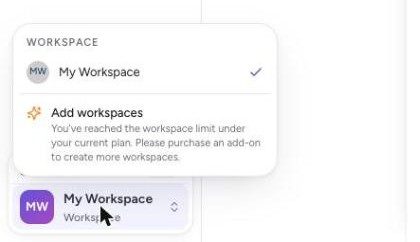
Pick a workspace. Select the workspace you want to switch to.
Add more, if you need to. The menu also shows Add workspaces. If you have reached the workspace limit for your plan, it says you need to purchase an add-on to create more. See Add a Workspace.
Tip
To see every workspace in one list, open your profile menu and select Workspaces.